
Looking for the best accounting software for sole traders usually starts as a shopping question and ends as a filing question. The honest answer is that the best one is whichever package is on the official compatible list, exports your data in a form you can still read in seven years, and matches how you already keep your books. That is a shorter list of requirements than most comparison articles will give you, and it rules out more products than any feature table.
The filing load changed, which is why this question got urgent
If you are trading as a sole trader in the United Kingdom, the arithmetic of your tax year has already changed. HMRC requires Making Tax Digital for Income Tax from 6 April 2026 where combined self employment and property income is over 50,000 pounds. Under that regime you keep digital records and send quarterly updates, then finish with a final declaration.
Count the filing events. Before, there was one Self Assessment return a year. Now there are four quarterly updates plus one final declaration, which is five filing events a year, a fivefold increase. Over three years that is fifteen filings instead of three. Over five years it is twenty five instead of five.
Nothing about your trading changed. The administrative surface area of the business went up by a factor of five.
That is the real reason the software question matters now. A spreadsheet that you reconciled once a year in a long unpleasant evening was survivable. The same spreadsheet, opened five times a year under a deadline, stops being survivable quite quickly. HMRC has said it will not apply penalty points for late quarterly updates in the first tax year, 2026 to 2027, which is a grace period and not a reprieve.
What makes the best accounting software for sole traders, in order
Rank the requirements by what actually fails, not by what sells. In order:
One, it has to be on the compatible list. This is binary. HMRC publishes the software that works with Making Tax Digital for Income Tax, and a package that is not on it cannot file your quarterly updates no matter how good the interface is. Check the list first and let it do most of the elimination for you.
Two, the export has to outlive the subscription. More on this below, because it is the requirement nearly everyone skips.
Three, it has to match your accounting basis. If you are on the cash basis, software built around invoicing and accruals will fight you every quarter. That choice is explained in cash basis versus accrual accounting, and it is worth settling before you pay for anything.
Four, it has to handle your actual categories. A trading business has a particular expense shape: platform and data costs, subscriptions, a home office proportion, professional fees. If the category structure cannot express the expenses a sole trader can actually claim, you will be recoding transactions by hand forever.
Five, and last, the interface. It matters, but it is the thing every review leads with and the thing that will not cause a problem in year three.
The export clause is the one that bites
Here is the mismatch that catches people. Software is rented by the month. Records are kept by the year, and the number of years is set by a tax authority rather than by you.
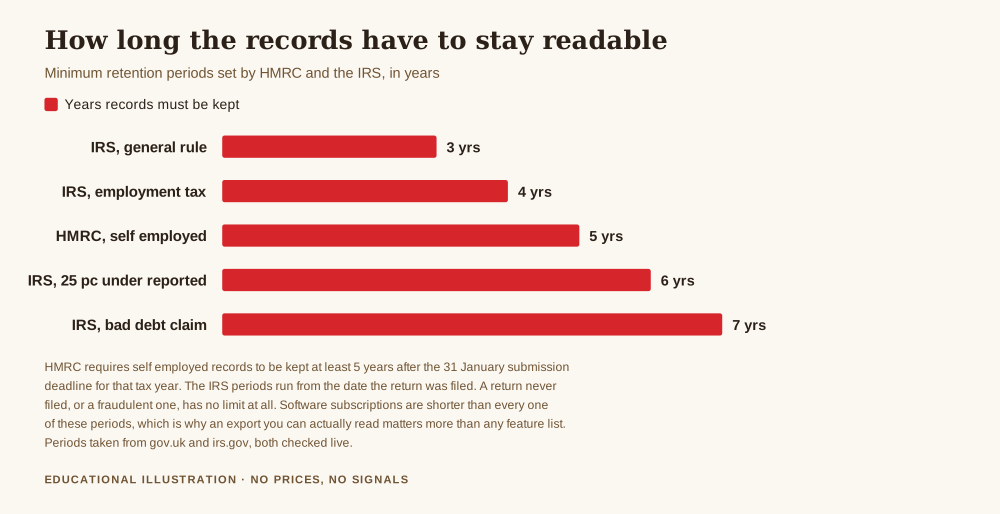
HMRC requires self employed records to be kept for at least five years after the 31 January submission deadline for that tax year. Work that through for the 2026 to 2027 tax year: the online deadline is 31 January 2028, so those records must survive until at least January 2033. That is roughly seven years from the start of the tax year they describe. If a return is sent more than four years after the deadline, the records must be kept for fifteen months after it is sent.
In the United States the Internal Revenue Service sets periods of limitation rather than a single retention rule. The general case is three years. Employment tax records run four years. If income is under reported by more than 25 per cent of gross income, six years. A claim for a loss from worthless securities or a bad debt, seven years. If no return is filed, or a fraudulent one is, there is no limit at all.
Now compare that with how often people change accounting software. Switch every three years while keeping five years of records and the oldest records have to survive at least one migration intact. Switch every two years and they have to survive two. The records always outlive the subscription, so the question is not whether you will ever export, it is whether the export will be readable when you do.
Which gives a concrete test to run before you commit. Put a month of real transactions in during the trial, then export. Open the export in something that is not the software. If what comes out is a usable file with your transactions, dates, amounts and categories intact, the package has passed the only test that matters in year five. If what comes out is a proprietary backup that only the vendor can read, you have rented your own records back from somebody.
What the subscription has to earn
Price is worth putting in proportion, because the numbers involved are small enough that agonising over them is itself a cost. Treat it as a break even on your own time, using figures you pick.
Take a package at 15 a month, so 180 a year. If you value an hour of your own time at 20, the software has to save you nine hours a year, which is about forty five minutes a month, to pay for itself. If you value an hour at 40, it has to save four and a half hours a year. At 25 a month, so 300 a year, the same two valuations need fifteen hours and seven and a half hours respectively.
Those are worked examples with made up rates, not quotes from any vendor, and that is deliberate: prices and tiers change often enough that any figure printed here would be wrong by the time you read it. The point is the shape. Under the quarterly regime, with five filing events a year instead of one, saving forty five minutes a month is a low bar. Most packages clear it on bank feed reconciliation alone. So the price comparison that people spend the most time on is usually the decision that matters least.
What a trading business actually has to record
One reason generic reviews are unhelpful is that they assume a business with customers, invoices and stock. A one person trading operation has none of those, and the things it does have are easy to record badly.
Trading results are the first trap. Profits and losses from trading are not ordinary turnover, and how they are reported depends on your jurisdiction, your status and whether the activity is treated as trading or investment. That is a question for an accountant who knows your situation, and the software will not settle it for you. What the software must do is let you keep those entries clearly separated from ordinary business income and expenses, so that whichever treatment applies, the underlying record supports it.
The costs are more straightforward and more often missed. Platform and data subscriptions, charting tools, exchange or market data fees, professional subscriptions, bank and transfer charges, accountancy fees, and a reasonable proportion of a home office if you qualify. These are recurring, individually small, and easy to lose track of across cards and accounts. Over a year they add up to a figure that matters, and an expense you never recorded is an expense you cannot claim.
Then there is the evidence. Receipts and statements have to be retrievable for the whole retention period, not merely stored somewhere today. If the software keeps attachments, check that they come out with the export rather than staying behind in the vendor's storage. A ledger line that references a receipt nobody can produce is worth very little when somebody asks.
None of this is exotic. It is the ordinary discipline of counting costs properly, which is the same discipline as counting risk properly, applied to a different column.
Where the software stops and the business starts
Bookkeeping software tells you what happened. It will not tell you whether the business is working, because it does not know what you intended. It records a loss and a win identically, as amounts on dates, which is correct for tax and useless for management.
That gap is where a trading business actually gets run. The ledger and the chart of accounts tell you where the money went. What they cannot hold is your risk ceiling, the conditions under which you stop for the day, and the review routine that catches a drift before the quarterly update does. That belongs on a one page trading business plan, and it is the half of the job no subscription performs for you.
Keep the two separated and both get easier. The software owns the record of what happened, accurately and in a format a tax authority will accept. You own the decision about what should happen next. Confusing the two is how people end up with immaculate books for a business that is quietly going nowhere.
Get the free REX one page trading business plan, the sheet that puts your risk ceiling, your costs and your review routine on a single page you will actually use. One email, no spam, unsubscribe anytime.
Get the free business plan →Frequently asked questions
What is the best accounting software for sole traders who trade?
The one on HMRC's compatible list that matches your accounting basis and lets you export readable records. Trading adds no exotic requirement beyond an expense structure that fits platform costs, data and subscriptions, so general sole trader packages are usually appropriate.
Do I have to use software at all?
If you are within Making Tax Digital for Income Tax, you must keep digital records and file quarterly updates through compatible software. Below that threshold a spreadsheet is still permitted, though the direction of travel is clear enough to make a compatible package the sensible default.
When did the quarterly requirement start?
From 6 April 2026 for those with combined self employment and property income over 50,000 pounds. HMRC has said penalty points will not be applied for late quarterly updates in the first tax year, 2026 to 2027.
How long do I have to keep the records?
HMRC requires at least five years after the 31 January submission deadline for that tax year. The IRS works to periods of limitation instead: three years generally, four for employment tax records, six where more than 25 per cent of gross income went unreported, seven for a worthless securities or bad debt claim, and no limit where no return was filed. More detail sits in how long to keep tax records as a sole trader.
Can I switch software later?
Yes, and you probably will. That is precisely why the export test matters. Keeping five years of records while switching every three means the oldest records must come through at least one migration still readable.
Is the most expensive package the best one?
No. Above the compatibility and export requirements, extra cost mostly buys features built for businesses with staff, stock and invoicing. A one person trading business has none of those, so the premium tier is usually paying for someone else's problems.
Where this leaves you
Run it as a business decision and it takes an afternoon. Open the official compatible software list and strike out everything not on it. From what remains, keep the packages that fit your accounting basis and your expense categories. Trial two. Put real transactions in, export, and open the export somewhere else. Pick whichever survived that test and stop thinking about it.
Then put the thing the software cannot hold somewhere it will not get lost. The books record the business. They do not run it. The risk ceiling, the stopping rule and the review routine live on your one page business plan, and those are the lines that decide whether the ledger is worth keeping at all.
Sources for this article, all checked live: HMRC guidance on signing up for Making Tax Digital for Income Tax and the official list of compatible software, HMRC on how long to keep self employed records, and the IRS on how long to keep records. The break even figures are arithmetic on stated assumptions and are not vendor prices.
About the author. Rex writes REX Trading on one idea: an account that is run like a business outlasts one that is run on instinct. That means a risk ceiling written down before the week starts, costs that are counted rather than estimated, and books that survive an audit without a weekend of archaeology. REX is free to follow and the business plan is optional. Nothing here is tax, legal or financial advice, thresholds and limits change and should be checked against the current official guidance for your own circumstances, and no entry, stop or target discussed should be treated as a signal.